Connect your Etsy shop
Connect your Etsy shop on My Stores with its shop name and Etsy shop ID. No Etsy sign-in is needed; products reach Etsy through Printify.
Updated · 4 min read
On this page
You connect your Etsy shop to PallFlow by entering its shop name and Etsy shop ID. There's no Etsy sign-in and no password. Your products reach Etsy through your Printify shop, and the PallFlow Chrome extensions take care of listing images and shop sections.
Where to find it
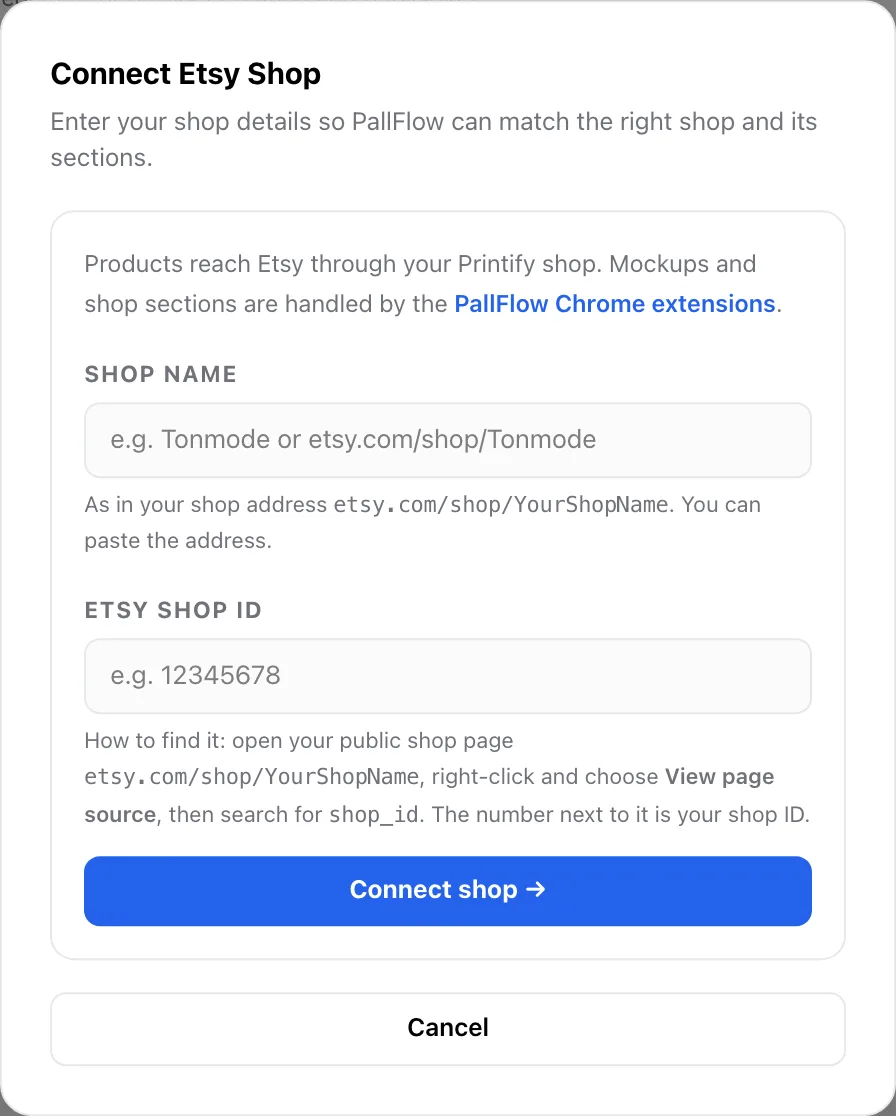
Settings → My Stores → Etsy → + Connect Shop: My Stores. The window is titled Connect Etsy Shop.
Before you start
- Add your Etsy shop to Printify first. See Add your Shopify or Etsy shop to Printify.
- Use a computer browser to look up your shop ID. You need the View page source option.
Step by step
Find your shop name
Your shop name is the last part of your shop address: etsy.com/shop/YourShopName. You can also copy the whole address; PallFlow picks the name out of it, even with extra parts such as ?ref=….
Find your Etsy shop ID
- Open your public shop page,
etsy.com/shop/YourShopName. - Right-click an empty part of the page and choose View page source.
- Press Ctrl + F (Windows) or Cmd + F (Mac) and search for
shop_id. - The number next to it is your shop ID, for example
12345678.
Connect the shop in PallFlow
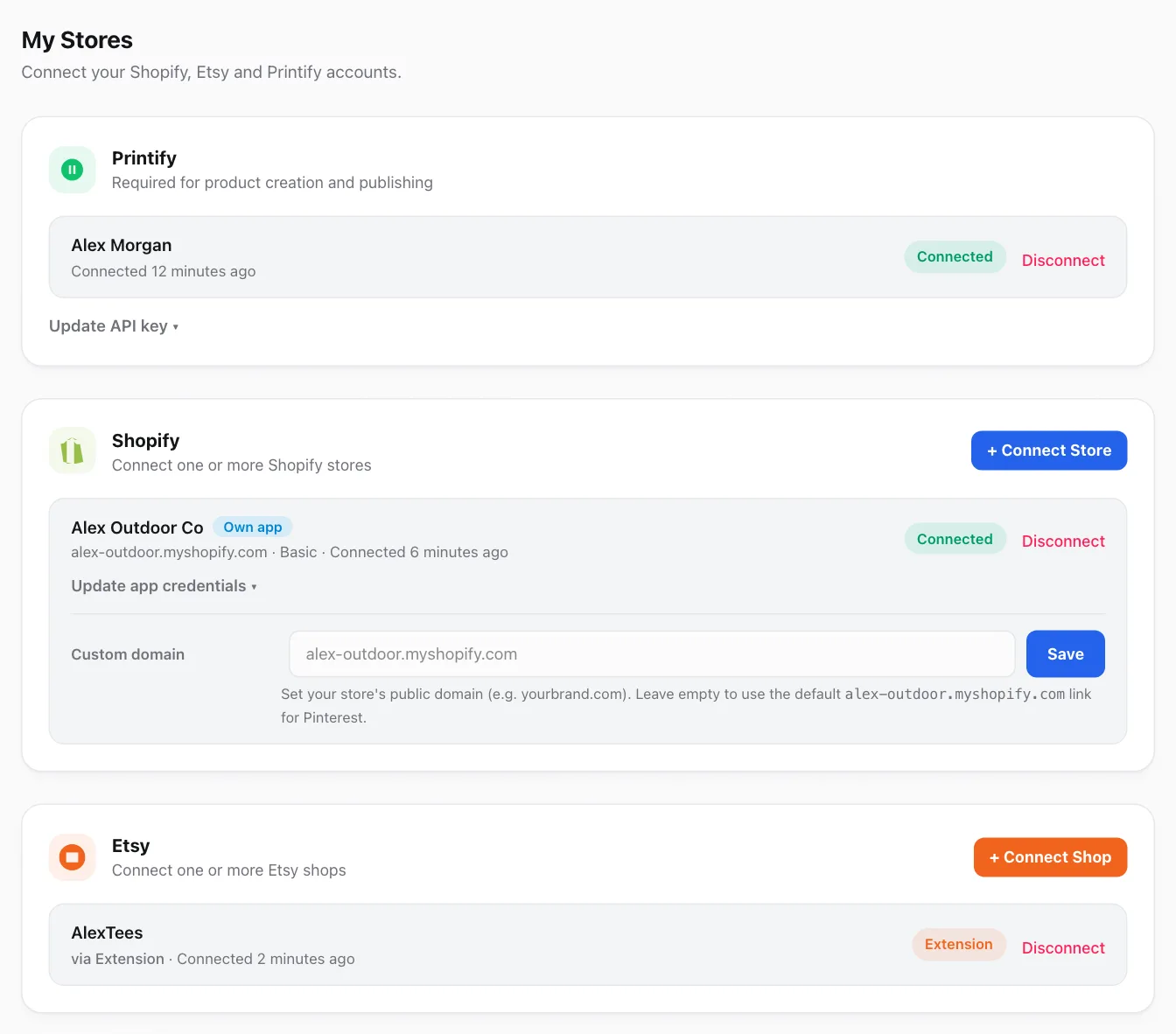
- Open My Stores and click + Connect Shop in the Etsy card.
- Fill in Shop name, for example
Tonmodeoretsy.com/shop/Tonmode. - Fill in Etsy shop ID, digits only.
- Click Connect shop →. Cancel closes the window.
What happens next
- You see "YourShopName: connected. Products reach it through your Printify shop."
- The shop is listed in the Etsy card with an Extension badge and the line via Extension · Connected ….
- In design step 2, the shop appears under Your connected store, so you can match it with your Printify shop.
- On Settings → Extensions, the PallFlow Etsy extensions can now work with this shop.
PallFlow doesn't check the shop name or ID with Etsy, so make sure both are right. The shop ID is what identifies the shop:
- Renamed your shop? Click + Connect Shop again with the new name and the same shop ID. PallFlow updates the existing entry.
- More than one shop? Repeat the steps for each one.
- Typed a wrong ID? A different ID creates a separate entry. Disconnect and remove the wrong one (see Manage and disconnect stores), then connect again with the right ID.
Credits and limits
- Connecting Etsy is free, and there's no limit on the number of shops.
- Shop name: up to 60 characters; letters, numbers,
-and_only, exactly as in your shop address. - Etsy shop ID: digits only, up to 20 digits. Spaces are removed for you.
Troubleshooting
"Enter the shop name as it appears in your shop address: etsy.com/shop/YourShopName." The name has spaces or other characters. Use the name exactly as in your shop address, or paste the full address.
"The Etsy shop ID is a number, for example 12345678."
Enter only the digits next to shop_id in the page source, not your shop name or a listing number.
"The shop name field must not be greater than 60 characters." Etsy shop names are short. Check that you entered the name, not a long address with a different format.
My Etsy shop doesn't appear under Sales channel in design step 2 That list comes from Printify. Add your Etsy shop in Printify first, then reload the step.
Settings → Extensions says "Connect your Etsy shop under My Stores first." No Etsy shop is connected yet. Connect it as above, then go back to Extensions.
I disconnected the shop by mistake Click Reconnect next to it. Its designs, automations, sections and settings are kept.