View your orders
The Orders page lists the orders from your Printify shops: order number, channel, items, total, status and date, synced every night.
Updated · 3 min read
On this page
The Orders page gives you one list of the orders that reached Printify from your Shopify and Etsy stores. Each row shows the order number, channel, number of items, total, status and when the order was placed. PallFlow brings in new orders automatically once a day.
Where to find it
Click Sidebar → Orders, or open Orders.
Before you start
- Connect Printify on My Stores. Orders come from Printify, from every shop on your Printify account. That includes shops you haven't connected to PallFlow.
- Orders appear only after they reach Printify. Orders for products that aren't fulfilled by Printify don't show up here.
How orders get here
- PallFlow syncs orders once a day, at 04:00 UTC. There's no button to sync manually.
- The first sync after you connect Printify loads your order history, newest first. After that, each sync adds the orders placed since the previous one.
- A new order shows up after the next nightly sync, so it can take up to a day.
What you'll see
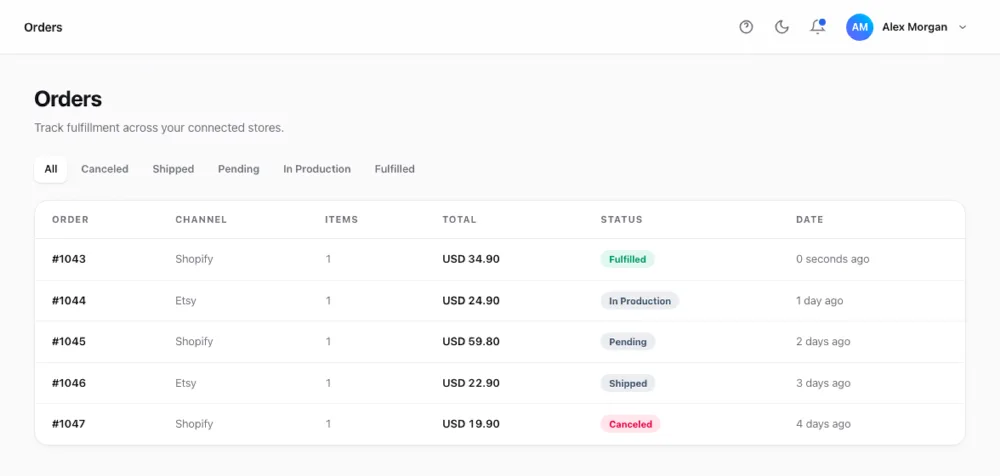
The page title is Orders, with the line "Track fulfillment across your connected stores." Above the table, status tabs (All plus each status you have orders in) filter the list.
| Column | What it shows |
|---|---|
| Order | Your store's order label when Printify provides it, otherwise a short Printify order ID starting with # |
| Channel | Shopify, Etsy, or the sales channel name Printify reports (— if unknown) |
| Items | The number of product lines in the order |
| Total | The order total as Printify reports it, with its currency. This is Printify's figure, so it can differ from what your customer paid in your store. |
| Status | See the table below |
| Date | When the order was placed, for example "3 days ago" |
Orders are sorted newest first, 20 per page. For privacy, PallFlow doesn't store customer names or addresses, and there's no order detail page. Use Printify or your store admin for those.
Status labels
| Label | Printify status |
|---|---|
| Processing | In production, sent to production, or any other open status |
| Fulfilled | Fulfilled, partially fulfilled or shipped |
| On Hold | On hold, or has issues. Check the order in Printify. |
| Canceled | Canceled |
| Unknown | Printify sent no status |
The status is the one Printify reported when PallFlow imported the order. After the first sync, status changes on older orders may not show up here. For the latest fulfillment status, check the order in Printify.
Where order data is also used
PallFlow links order lines to your designs when the product was created through PallFlow. Retention rules use this sales information to decide which products to keep.
Credits and limits
Viewing orders is free and doesn't use credits. Orders sync once a day.
Troubleshooting
"No orders yet" with "Orders from your connected stores will appear here once they sync." No orders have been imported yet. If you just connected Printify, wait for the next sync at 04:00 UTC. Also check that your store actually sends orders to Printify, in Printify's own orders list.
An order I can see in Printify is missing It was probably placed after the last nightly sync. Check again tomorrow.
The total doesn't match my store The total comes from Printify, not from your Shopify or Etsy order. Discounts, shipping and taxes in your store can make the amounts differ.
The status looks out of date Statuses aren't refreshed for older orders. Open the order in Printify for its current status.