Social account fees
How the monthly credit fee for each connected social account works: tiers, when it is charged, what happens when credits run short, and how to stop it.
Updated · 4 min read
On this page
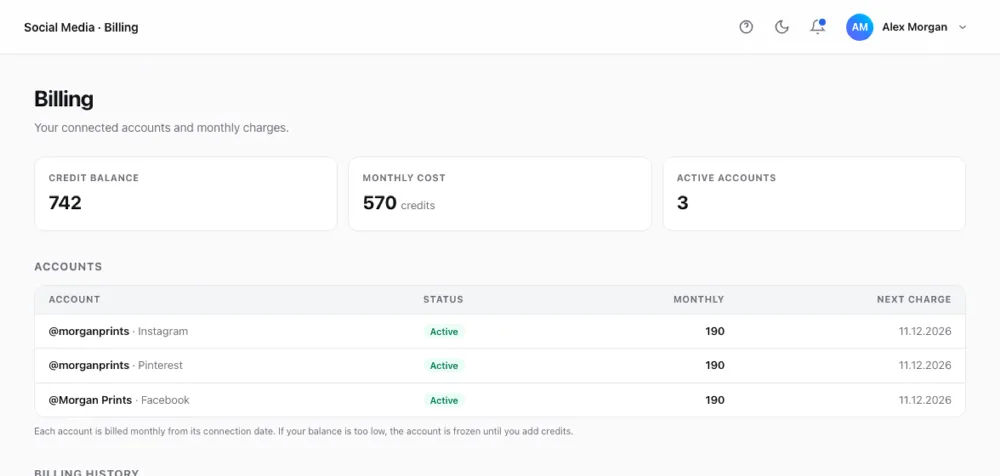
Every connected social account costs a monthly fee in credits, taken from your PallFlow credit balance. There's no separate payment or card for social accounts. Social → Billing shows what each account costs, when it's charged next and every charge so far.
Where to find it
Sidebar → Social → Billing: Social billing. The page heading is Billing.
Note: This is not Settings → Billing, which holds your invoice details.
How the fee works
| Account number | Monthly fee per account |
|---|---|
| 1–10 | 190 credits |
| 11–100 | 170 credits |
| 101 and up | 150 credits |
- Which tier applies: accounts are numbered in the order you connected them, frozen ones included. Your 11th account is billed at the 11–100 rate; your first ten keep the 1–10 rate. If you remove an earlier account, the later ones move up a place from their next renewal.
- First month: charged the moment the account connects. You see the fee before you connect, in the Connect an account box and the confirmation dialog.
- Renewals: charged every month on the same day as the connection. PallFlow checks for due accounts once a day, so a renewal can land up to a day later. If a charge happens more than 3 days after its due date (for example after an account was frozen), the new month starts on the day of the charge.
- In your credit history: each charge appears in Settings → Credits History as "Social account: instagram @yourshop".
Publishing, scheduling and editing posts don't cost extra. AI captions and AI pin texts cost 10 credits per use.
What the Billing page shows
- Credit balance, Monthly cost (the total for your active accounts) and Active accounts.
- Accounts: each account with Status (Active or Frozen — add credits), Monthly fee and Next charge date. A Due badge means the renewal is waiting for the next daily run.
- Billing history: your last 50 charges with Date, Platform, Status (Charged or Failed (frozen)) and Credits.
When credits run short
When you connect: PallFlow won't open the platform's login if your balance is below one month's fee. You'll see "Not enough credits to connect an account (… credits needed)."
At renewal: if your balance can't cover the fee, the account is frozen:
- It shows Frozen — add credits on Billing and Failed (frozen) in the history.
- You get a notification and email: "Account frozen: Instagram" — "Not enough credits. Add credits to reactivate."
- New posts can't be sent to it, and it disappears from the account list in Pin Studio.
- It stays connected and frozen until you add credits or remove it.
Reactivation is automatic. As soon as credits are added to your balance (a credit pack, your plan renewal or an upgrade), PallFlow charges frozen accounts, oldest first, as far as your balance goes. Each reactivated account starts a new month that day. There's no button to press.
Stop paying for an account
- Open Social → Connections.
- Click ✕ on the account and confirm Remove.
Charges stop from then on. The month already paid isn't refunded, and connecting the same account again later starts a new paid month.
Note: An account that shows needs reconnect or disconnected isn't charged while the connection is lost. Reconnect it to keep posting; the fee is charged again from the next daily billing run.
Credits and limits
- Fees per tier: see the table above.
- There's no cap on the number of accounts.
- To add credits, buy a pack or change plans in Settings → Plans.
Troubleshooting
"Not enough credits to connect an account (… credits needed)." Add credits first. The first month is charged when you connect.
An account shows "Frozen — add credits" Add credits in Settings → Plans. The account reactivates on its own once the fee is paid.
"Select at least one valid account." when posting All accounts you chose are frozen or removed. Add credits or choose another account.
My new account costs more than the others You've passed 10 (or 100) accounts, so the new one falls into the next tier.
I was charged for an account I can't post to Accounts that lost their connection aren't charged at renewal. A charge from before the connection was lost covers the month already started. Reconnect the account on Social → Connections, or remove it if you don't use it anymore.