How credits work
What credits are, where they come from, what each action costs, why plan credits do not roll over, and what happens when you run out.
Updated · 5 min read
On this page
Credits are how you pay for work in PallFlow. AI images, AI listings, AI mockups, upscaling, AI social content, file storage and connected social accounts all use credits. Your plan gives you a new batch of credits every month, and you can top up any time with a credit pack.
Where to find your balance
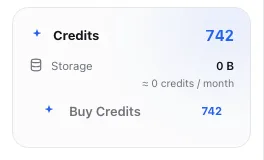
- Sidebar: the Credits box at the bottom shows your balance. Below it, Storage shows how much space your files use and roughly how many credits that costs per month. Buy Credits opens the Plans page.
- Settings → Plans (Plans): your plan, what each action costs, and credit packs.
- Settings → Credits History (Credits History): every credit added or spent.
Where credits come from
| Source | When you get them | Do they expire? |
|---|---|---|
| Free plan credits (50 a month) | When you confirm your email (or sign up with Google), then on the 1st of every month while you are on the Free plan | Yes, unused ones are replaced at the next monthly refill |
| Paid plan credits | When your first payment goes through, then at every monthly renewal | Yes, unused ones expire at the next renewal |
| Upgrade credits | Right away when you upgrade, for the rest of the current period | Yes, together with your plan credits |
| Credit packs | As soon as Stripe confirms the payment | Never |
The current plans:
| Plan | Price | Credits every month |
|---|---|---|
| Free | Free | 50 |
| Starter | $24.90/mo | 500 |
| Pro | $54.90/mo | 2,000 |
Every plan includes every feature. Plans differ only in monthly credits and price per credit. See Plans: subscribe, upgrade, downgrade or cancel.
What costs credits
| What you do | Cost |
|---|---|
| Listing Tags | 1 credit |
| Listing Title | 1 credit |
| Reference Image → Prompt | 1 credit |
| Listing Description | 2 credits |
| Storage (per GB / month) | 2 credits |
| Full Listing (all) | 3 credits |
| Image Upscale | 3 credits |
| AI Mockup | 5 credits |
| AI Auto Mockup | 7 credits |
| AI Image Generation | 10 credits |
| AI social content | 10 credits |
| Social account (1-10) | 190 credits per account per month |
| Social account (11-100) | 170 credits per account per month |
| Social account (101+) | 150 credits per account per month |
- Costs can differ by plan. On the Plans page, Credit costs on your plan lists your costs and Compare credit costs by plan compares every plan. When you are signed in, the costs in this Help Center show your plan's prices.
- Uploading your own artwork, building and publishing products, and all the settings pages don't use credits.
- Two things are charged every month instead of per use:
- Storage: 2 credits per GB per month, taken on the 1st for the previous month's average use. See Storage usage and storage fees.
- Connected social accounts: a monthly fee per account. See Social account fees.
When credits are taken
PallFlow checks your balance before an action starts. Most AI actions take the credits only once the result is ready, so a generation that fails normally costs nothing. Automations spend credits as they create each product.
Plan credits don't roll over
- At the start of each billing period, the plan credits you didn't use expire and the new period's credits arrive. Credits History shows this as Unused plan credits expired.
- Your spending counts against plan credits first. Credits from packs stay in your balance until your plan credits are used up, and they never expire.
- Example: your plan gives 1,000 credits, you also bought a 300-credit pack, and you used 600 credits this period. At renewal the 400 unused plan credits expire and the 300 pack credits stay.
- When you move from the Free plan to a paid plan, your unused Free credits are replaced by the paid plan's credits. Pack credits stay.
- When a paid plan ends, you move to the Free plan. Your remaining plan credits stay until the next Free refill on the 1st, when unused ones are replaced by the Free credits.
When you run out
- Actions that need credits stop with a message such as "Insufficient credits. You need … credits to generate an image." Your work isn't lost: add credits and try again.
- Automations skip their runs until you have enough credits again. See Why didn't my automation run?
- If the monthly storage fee can't be taken, it becomes overdue. You have 5 days to add credits before your stored files are deleted. See Storage usage and storage fees.
- Social accounts whose monthly fee can't be paid are frozen until you add credits.
- As soon as you add credits (a pack, a new plan or a renewal), PallFlow first collects any overdue storage fee and reactivates frozen social accounts.
- On the Free plan, new credits arrive on the 1st. You can also buy a credit pack or upgrade.
Troubleshooting
"Insufficient credits. You need … credits to generate an image.", "Not enough credits. You need … credits to generate a mockup." Your balance is lower than the action's cost. Click Buy Credits in the sidebar to buy a pack or upgrade, then try again.
"Not enough credits for AI content." The same, for AI text in the social composer.
My balance is lower than I expected. Open Settings → Credits History. Look for Unused plan credits expired at renewal, monthly storage fees (Storage for …) and social account fees.
I didn't get my Free credits. Free credits start once you confirm your email address. The monthly refill only applies while you have no paid plan, including a paid plan that is paused because of a failed payment.